

Crypto Payment API: How to Connect Checkout, Webhooks, and Reconciliation
Share
⏱️ TL;DR: A crypto payment API connects checkout, blockchain confirmation, backend order updates, and reconciliation. CCPayment provides payment creation, blockchain monitoring, webhooks, and transaction-level reporting, helping teams connect customer payments with fulfillment and finance through one lifecycle: Create → Pay → Confirm → Notify → Reconcile.
A customer selects a $49 SaaS plan and pays in crypto. Your backend needs to link that payment to the order, activate the subscription, and give finance a clear record of the funds received.This guide follows that $49 order through Create → Pay → Confirm → Notify → Reconcile, showing how each stage connects to the next.
How Does a Crypto Payment API Work?
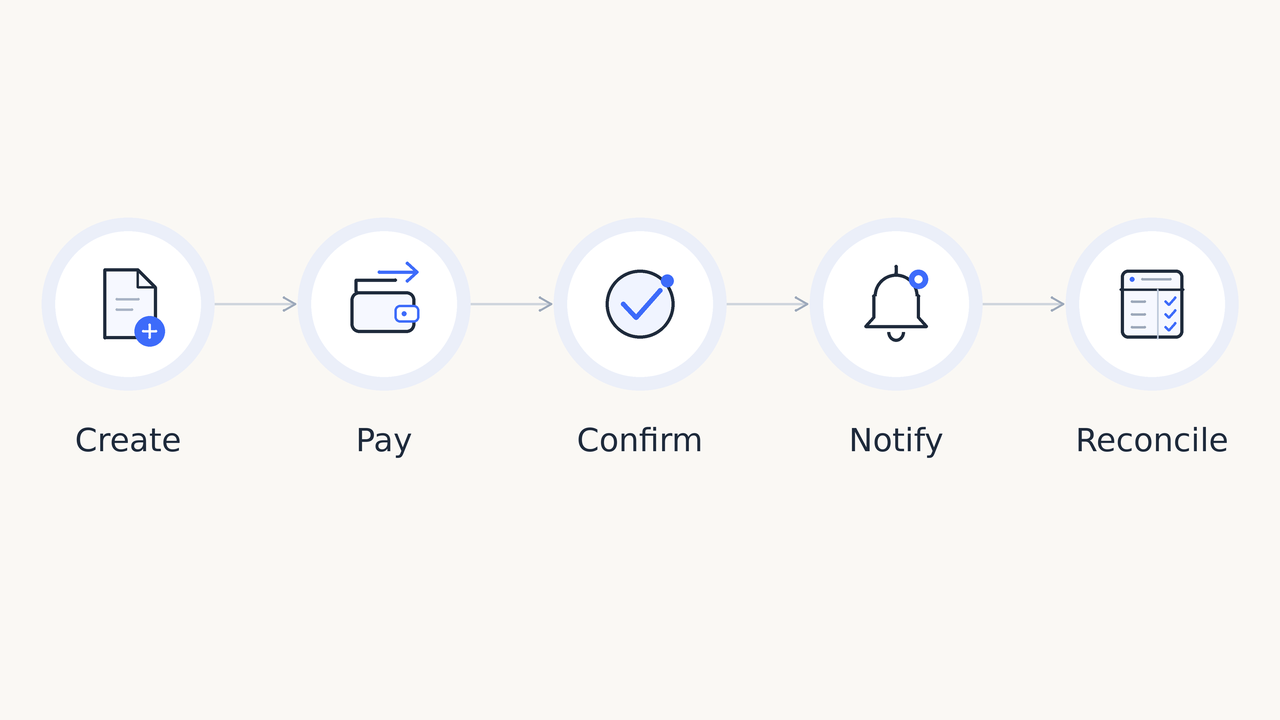
A crypto payment gateway API links your business orders to cryptocurrency payments. The merchant backend controls pricing, customer accounts, and fulfillment. The payment gateway provides the infrastructure for accepting and tracking the payment.
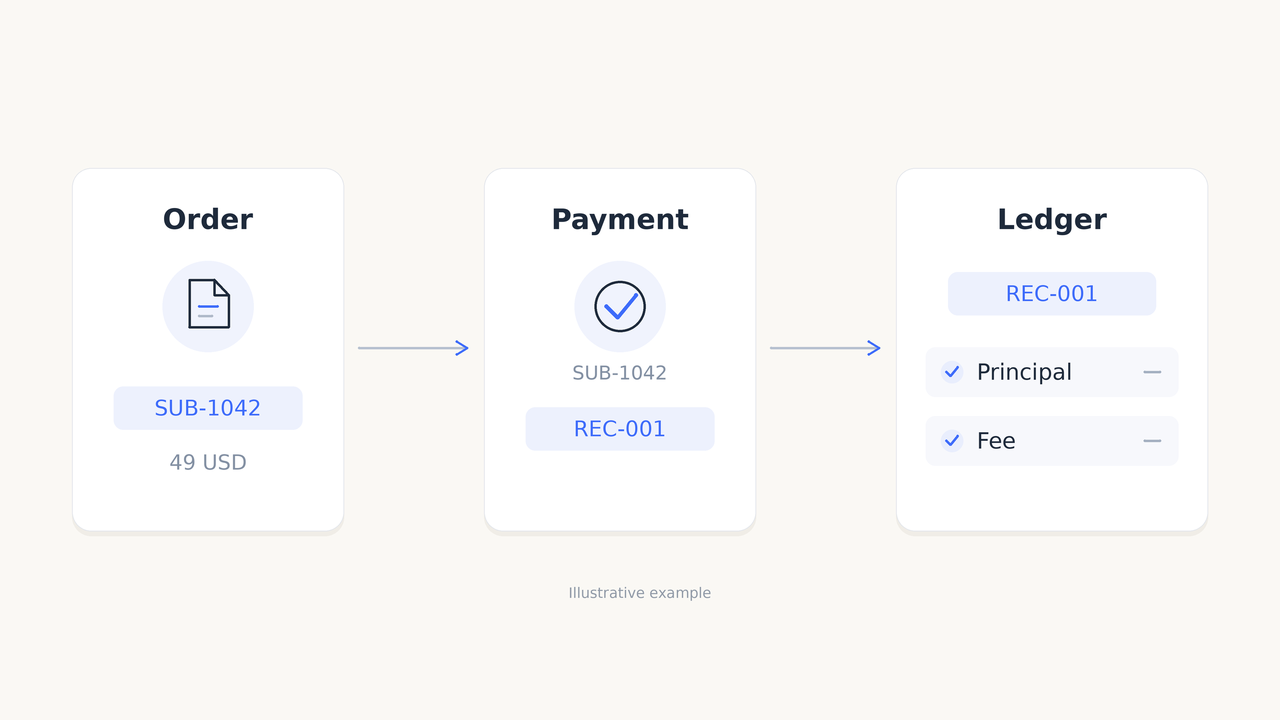
For our SaaS purchase, the backend assigns an order reference, such as SUB-1042. That reference connects the subscription purchase with payment activity and later accounting checks.
CCPayment's Payment API gives developers two checkout approaches: specify the payment currency and network in the application, or let customers choose them on a hosted checkout page.
Your team can build around the experience its customers need, while CCPayment monitors the blockchain payment. The same order reference then carries the purchase through backend verification, subscription activation, and reconciliation.
Step 1: Creating a Crypto Payment Order
When the customer selects Crypto Payment, your backend creates SUB-1042 with the $49 price, customer reference, and subscription details, then sends a signed payment request to CCPayment. You can keep the plan priced in USD while accepting payment in cryptocurrency.
Choose the API pair that matches your checkout:
Checkout approach | Create payment | Retrieve order details |
|---|---|---|
Customer selects currency and network | createInvoiceUrl | getInvoiceOrderInfo |
Your application specifies currency and network | createAppOrderDepositAddress | getAppOrderInfo |
Save the response against SUB-1042 before opening checkout. Retain the original USD price alongside the crypto payment details so support and finance can trace the purchase. The customer then follows the displayed currency, network, amount, and address instructions to pay.
Step 2: Detecting and Confirming Blockchain Payments
A detected transaction is not necessarily a confirmed payment. A transfer can be visible on the blockchain while it is still progressing through the required confirmations.
CCPayment monitors the payment and tracks its confirmation status, helping your team accept crypto without building a separate blockchain monitoring service for each supported network.The Bitcoin developer payment-processing guide explains the underlying principles: associate incoming payments with payment requests, then use blockchain confirmations to assess the transfer.
For SUB-1042, your application can show "Awaiting payment" and "Confirming" as progress indicators. These business states keep the customer informed while CCPayment tracks the blockchain confirmation status.
This gives customers a useful progress indicator while keeping product access aligned with confirmed payment information. CCPayment communicates that payment activity to your backend through webhooks.
Step 3: Using Webhooks to Update Payment Status
A crypto payment webhook connects payment activity with your order system:Blockchain event → CCPayment → Webhook → Merchant backend → Order statusFor SUB-1042, process each notification through three steps:
- Authenticate the notification. Check the signature, identify the associated order, and follow CCPayment’s documented acknowledgment requirements. OWASP's webhook security guidance provides further implementation guidance.
- Verify the payment. Use the notification’s references to query payment details through the API. Check the confirmed payment amount and review status before granting access; a customer’s return to your website can display progress but should not trigger fulfillment.
- Update the order once. Record each payment by
recordId, prevent duplicate credits, and ensure the subscription activates only once across all its payment records. Continue processing valid status changes for existing records.
CCPayment provides automatic notification retries, webhook logs, and individual or batch resends, giving developers and support teams practical tools to inspect delivery results and restore order synchronization.
Handling Payment Exceptions and Status Changes
The same order references also help your application manage payments that need an additional step.
Suppose the customer sends less than the amount required for SUB-1042. Your backend records that receipt and keeps the subscription pending. If another eligible payment is received for the same order, the backend evaluates the order's verified payment records against the required total before fulfillment.
Payment situation | How to keep the order synchronized |
|---|---|
Underpayment | Keep the order pending while tracking additional payments. |
Overpayment | Fulfill the purchase once and retain the excess amount for follow-up. |
Payment after expiry | Query the payment details and apply your late-payment handling policy. |
Repeated notification | Refresh verified information without repeating credit or fulfillment. |
Payment requiring review | Use isFlaggedAsRisky to route the payment for review before fulfillment. |
Keep a short history of payment and fulfillment updates. With the order and payment references available, support can explain the outcome without reconstructing the purchase from screenshots.
From Payment Confirmation to Reconciliation
Once SUB-1042 is paid and the subscription is active, finance needs to match the purchase with the funds received.
Crypto payment reconciliation connects the business order, payment records, fees, and balance movements. The USD selling price explains what the customer purchased; the received crypto amount and associated conversion information explain how it was paid.
Retain the merchant order ID, CCPayment record IDs, asset, network, transaction hash, received amounts, fees, and timestamps. An order may have several payment records, so keep each receipt linked to the same purchase. Calculate crypto amounts with decimal precision.
In CCPayment's Transaction Ledger, finance can search for SUB-1042 by Order ID or use a payment's Record ID to review principal and fee entries. Links from Financial Statement connect summary totals to the underlying records, giving teams a clear route from a reported amount to its source.
Align the reporting period, time zone, and asset when comparing totals. Scheduled checks of pending orders help keep operational payment records current.
Crypto Payment API Integration Checklist
Before launch, run SUB-1042 through checkout, payment confirmation, subscription activation, and reconciliation. Your crypto payment API integration should pass these checks:
- Create: The backend saves a unique order reference and calculates the price before requesting payment.
- Configure: Required tokens, API access settings, and webhook destinations are ready.
- Protect: Credentials stay server-side; invalid webhook signatures are rejected.
- Confirm: Product access follows verified payment status, amount, and review eligibility.
- Update: Later payment updates reach the correct order without reversing completed fulfillment.
- Deduplicate: Each eligible receipt is credited once and each purchase is fulfilled once.
- Recover: Webhook logs and resend tools have been tested.
- Handle exceptions: Underpayment, overpayment, and late-payment cases have clear outcomes.
- Reconcile: The order matches its payment records, fees, and ledger entries.
Building Crypto Payment Workflows With CCPayment
CCPayment's cryptocurrency payment API connects checkout, payment monitoring, webhooks, and reporting, helping your team launch crypto payments and manage them as volume grows.
Deposit fees start from 0.2%, helping businesses keep payment costs competitive as transaction volume increases.
Ready to connect checkout, payment updates, and reconciliation? Register with CCPayment and start building your crypto payment workflow with our Payment API and developer documentation.
Crypto Adoption for Business 2026
Deep dives into Web3 payments, industry trends, and how to scale your global commerce with zero-code integrations.
FAQ
Q1: Can I add CCPayment to my existing website or app?
A: Yes. CCPayment supports Hosted Checkout and merchant-controlled checkout flows through the Payment API, allowing you to add crypto payments without replacing your existing order and fulfillment systems.
Q2: Can I price products in USD and accept crypto payments?
A: Yes. Products can remain priced in USD while the payment request calculates the corresponding cryptocurrency amount. Store both the original fiat price and the resulting payment details for support and reconciliation.
Q3: How can I track customer payments with CCPayment?
A: CCPayment monitors blockchain payments and sends status updates to your backend. Your system can verify each payment through the API, while Dashboard records and Webhook delivery records help operations and support teams investigate individual orders.
Q4: Can I test the payment process before going live?
A: Yes. Use TETH test coins on ETH Sepolia to test deposits, withdrawals, and payment notifications before accepting real funds.
Q5: How does CCPayment make payment reconciliation easier?
A: Transaction Ledger lets finance search by Order ID or Record ID and review principal and fee entries separately. The Financial Statement links summarized amounts to the corresponding ledger entries, helping teams trace reported totals back to individual transactions.