Monero (XMR) Now Live on CCPayment: Native Privacy-First Settlement for 2026
⏱️ TL;DR: CCPayment now supports native Monero (XMR) deposits and withdrawals. Enjoy zero slippage and full privacy control with no forced auto-conversion. Perfect for VPNs, iGaming, and cross-border platforms. Enable it in one click in your merchant dashboard.

XMR Is Live on CCPayment
Monero is now available as a supported currency on the CCPayment payment infrastructure. If you're already integrated with CCPayment, XMR is one toggle away — enable it in your Dashboard under Merchant Settings → Tokens for your business, and it appears alongside your other supported coins.
No separate integration. No dedicated Monero node. The same unified API, one dashboard, and a single reconciliation workflow handle everything — XMR included.
This matters because Monero has been the obvious missing piece for a specific set of merchants. VPN providers. VPS hosts. iGaming platforms. Cross-border sellers whose customers actively seek privacy at checkout. If your business falls into one of those categories, your checkout just gained a payment method that aligns with how your customers already think about financial privacy.
Native XMR Settlement
Here's the detail that matters most for your finance team, and we're going to state it clearly upfront: CCPayment supports native XMR settlement only. When a customer pays in Monero, you receive Monero. There's no automatic conversion to USDT or USDC in the background. No hidden exchange spread. No slippage the finance team discovers at month-end reconciliation.
This is a deliberate design choice, not a technical limitation. Monero's privacy architecture makes automated exchange routing incompatible at the gateway level. The trade-off is that you maintain full custody of the asset, and your treasury team manages conversion on your own terms — through your preferred OTC desk or exchange, at the timing and pricing you control.For businesses that already hold or manage XMR, this workflow is familiar.
For businesses adding XMR for the first time, the operational implication is straightforward: you'll receive native XMR to your merchant balance, and your finance team should establish a regular conversion schedule if you prefer to hold stablecoins or fiat.The upside is equally clear: zero slippage at the point of payment. The amount your customer sends is the amount you receive. No one takes a cut in the middle.
Who XMR Is For
XMR on CCPayment is designed for businesses that already understand why they want to accept Monero. The typical profile: you have a privacy-conscious customer segment, and you've identified that offering XMR at checkout reduces friction for that segment.This works well for:
- VPN, VPS, and security tool providers whose customers self-select for privacy awareness
- iGaming platforms serving jurisdictions where players actively seek payment privacy
- Cross-border sellers and B2B service providers who want to keep supplier payment flows confidential
- Freelancer platforms paying contractors in markets where banking access is unreliable
It's less suited for businesses that require fully automated fiat settlement for every transaction. If your treasury workflow depends on instant, hands-off conversion of every incoming payment to stablecoins, XMR will require an additional manual step that your team should plan for.
Add XMR to Your CCPayment Integration
If you already live on CCPayment, enabling XMR takes under a minute.
Navigate to Dashboard → Merchant Settings → Tokens for your business, toggle XMR on, and it's live. The same API endpoints that handle your USDT and USDC payments now handle XMR. The same webhook structure pushes payment confirmations to your system. The same reconciliation workflow applies — deposit addresses are generated per user or per invoice, and payment confirmation triggers a webhook notification.
For new merchants, the integration path is the same for XMR as for any other supported currency. CCPayment's unified API means you integrate once and add currencies as needed — no per-coin integration work, no separate node infrastructure, no custom blockchain monitoring logic.
How to Enable XMR in Your CCPayment Dashboard
The integration path is the same as any other coin you've added through CCPayment.
Step 1: Enable in Dashboard
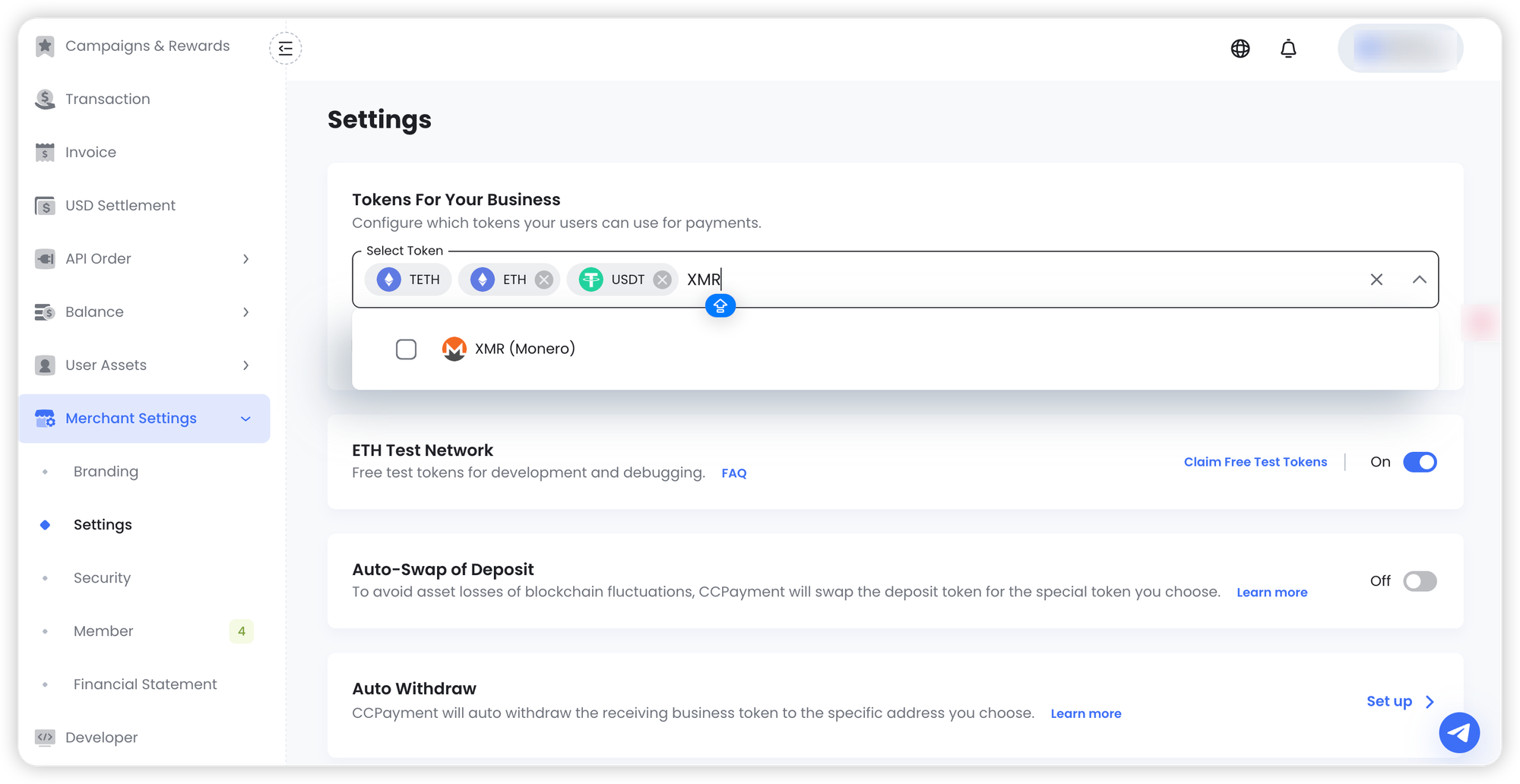
Navigate to Merchant Settings → Tokens for your business. Find Monero (XMR) in the token list and enable it. That's it — no separate configuration, no new credentials.
Step 2: Accept XMR
Once enabled, XMR appears as a payment option alongside your other supported coins. Customers select it at checkout, CCPayment generates a deposit address, and the payment flow runs exactly like your existing crypto payments.
If you're using the API, the integration is identical — just pass the relevant coin ID and chain parameters.
  app_id = "*** your app_id ***"
  app_secret = "*** your app_secret ***"
  url = "https://ccpayment.com/ccpayment/v2/createAppOrderDepositAddress"
  content = {
    "coinId": 2168,
    "price": "1",
    "orderId": str(int(time.time())),
    "chain": "MONERO",
  }
Step 3: Track and Reconcile
CCPayment sends webhook notifications on payment confirmation, just like any other coin. You can pull transaction details via Get deposit record endpoint or monitor balances through the dashboard.
Step 4: Withdraw or Hold
XMR accumulates in your merchant balance. Withdraw to an external wallet, transfer to Cwallet, or hold it — the choice is yours.
A Note on Reconciliation and Compliance
Reconciling XMR payments requires one adjustment to your standard workflow. Because Monero transactions are private by default, your finance team won't be able to look up transaction details on a public block explorer the way they would with USDT or BTC. Instead, every XMR payment in CCPayment carries a unique internal record ID — use that as your reconciliation anchor, not an external block explorer.
On the compliance side, CCPayment screens all transactions through its standard KYT and AML infrastructure. Your business is protected from interacting with sanctioned or high-risk counterparties, while your customers retain the privacy Monero provides at the protocol level. You control your compliance posture; CCPayment provides the screening layer.
Get Started with XMR
If Monero is already on your roadmap, enabling it takes under a minute in your CCPayment dashboard. If you're evaluating whether XMR fits your customer base, the fastest path is to enable it, offer it to a segment of your users, and measure the conversion lift.
Existing merchants: navigate to Dashboard → Merchant Settings → Tokens for your business, toggle XMR on, and you're live.
New to CCPayment? Create an account, complete verification, and access the same unified API with support for over 900 cryptocurrencies — XMR included.
👉 Enable XMR on CCPayment Now
👉 Talk to the BD team about a custom fee rate
FAQ
Q1: Is XMR a good fit for privacy-focused businesses?
A: XMR can be accepted by many businesses, but local rules vary by jurisdiction and industry. Before enabling it, please confirm with your legal or compliance team that it fits your operating requirements.
Q2: Can I withdraw XMR to an external wallet or exchange?
A: Yes. You can initiate XMR withdrawals from your CCPayment dashboard to any external Monero wallet address. Your finance team controls the timing and destination of every withdrawal.
Q3: Who is XMR best for on CCPayment?
A: XMR is a strong fit for privacy-conscious businesses such as VPN, VPS, iGaming, and cross-border service providers. If your customers already prefer private payment options, adding XMR can make checkout feel more natural and reduce friction.
Q4: How does XMR settlement work on CCPayment?
A: XMR is settled natively on CCPayment. If your finance team prefers stablecoin or fiat exposure, conversion can be handled externally after receipt.
Q5: How fast are XMR deposits confirmed?
A: Monero blocks are produced every 2 minutes. CCPayment requires 10 block confirmations before crediting your balance, which means a typical XMR deposit takes about 20 minutes to confirm. This is standard for Monero — the network doesn't offer the near-instant finality of chains like TRON, but the trade-off is complete transaction privacy.
Crypto Adoption for Business 2026
Deep dives into Web3 payments, industry trends, and how to scale your global commerce with zero-code integrations.