CCPayment Now Supports WBTC, ASTER, WLD and KCS Payments


⏱️ TL;DR: CCPayment now supports WBTC on Ethereum, ASTER on BNB Smart Chain, WLD on Optimism Mainnet, and KCS on Ethereum for payments and withdrawals. Merchants can enable them under Merchant Settings → Settings → Tokens For Your Business without creating a separate integration.
Four New Ways to Pay with CCPayment
Merchants can now accept crypto payments with CCPayment using four additional assets: WBTC, ASTER, WLD, and KCS. This gives customers the option to pay directly with tokens already in their wallets. Removing the extra conversion step can make payments easier to complete.
Existing CCPayment merchants can add all four assets through their current integration, with no separate wallet system, node, or payment workflow to build for each token.
Four New Assets at a Glance
| Asset | Supported Network | Payment Collection | Dashboard & API Withdrawals |
| WBTC | Ethereum | ✅ | ✅ |
| ASTER | BNB Smart Chain | ✅ | ✅ |
| WLD | Optimism Mainnet | ✅ | ✅ |
| KCS | Ethereum | ✅ | ✅ |
New Asset Breakdown: WBTC, ASTER, WLD and KCS
WBTC on Ethereum: Accept WBTC Payments from Bitcoin-Focused Users
WBTC brings Bitcoin-linked liquidity into Ethereum applications. According to the WBTC website, WBTC is designed to be backed 1:1 by Bitcoin, with reserve information made available for verification.
- Best suited to: DeFi tools, trading services, and Web3 platforms whose users already hold WBTC.
- Payment examples: Account funding, digital products, premium tools, and subscriptions.
ASTER on BNB Smart Chain: Accept ASTER Payments from On-Chain Traders
The Aster documentation identifies ASTER as a BEP-20 token on BNB Chain, making it particularly relevant to businesses serving on-chain trading users.
- Best suited to: Trading tools, market-data products, paid communities, and BNB Chain applications.
- Payment examples: Platform credits, memberships, premium features, and digital services.
WLD on Optimism: Accept WLD Payments for Digital Services
WLD is part of the World ecosystem, which focuses on digital identity and financial access. The World Whitepaper lists tipping and purchasing goods among its potential uses.
- Best suited to: Mini Apps, digital communities, and creator-focused services with users holding WLD on Optimism.
- Payment examples: Digital goods, memberships, tips, and paid app features.
KCS on Ethereum: Accept KCS Payments from Existing Token Holders
KCS is the utility token associated with the KuCoin ecosystem and its broader community.
- Best suited to: Web3 services, trading-related products, and digital platforms with an existing KCS audience.
- Payment examples: Service fees, account top-ups, digital products, and paid access.
How CCPayment Supports Multi-Asset Payments
All four assets follow the same CCPayment payment flow:
- Create the payment. Generate a payment address or hosted checkout page for the selected asset and network.
- Receive the status update. Webhook notifications can inform the merchant system of payment-status changes. Merchants should verify the related payment record and apply idempotent handling before updating an order, service balance, or membership.
- Check the transaction. The Dashboard shows the asset, network, amount, payment status, and transaction hash for support and reconciliation.
- Manage the funds. Received funds are reflected in the merchant’s CCPayment account balance, subject to CCPayment’s supported-asset and balance-handling rules.
Developers can use the CCPayment Payment API to retrieve the current token list and network information instead of maintaining these details manually. Merchants can also browse the wider list of CCPayment supported cryptocurrencies when choosing other assets for their checkout.
How to Enable the New Assets
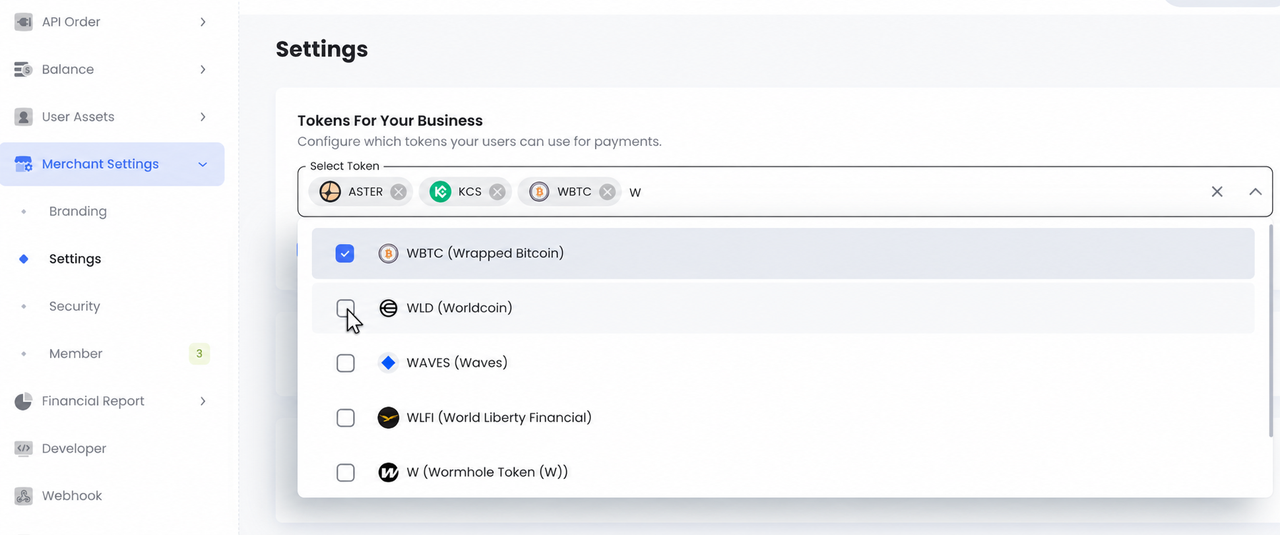
Existing merchants can enable the new assets in a few steps:
- Sign in to the CCPayment Dashboard.
- Go to Merchant Settings → Settings → Tokens For Your Business.
- Search for WBTC, ASTER, WLD, or KCS and enable the required assets.
Before going live, make sure the payment experience clearly identifies both the token and the intended network.Clear labeling helps customers use the intended chain and makes payment checks easier for support teams.
Four Assets, More Payment Choice
WBTC, ASTER, WLD, and KCS give merchants access to different crypto audiences through the CCPayment integration they already use. Adding these payment options takes only a few clicks, while payment collection, transaction tracking, and withdrawals remain in one familiar workflow.
Let customers pay with the assets already in their wallets and make every checkout easier to complete.
Enable WBTC, ASTER, WLD, and KCS under Tokens For Your Business now!
FAQ
Q1: Why should businesses accept WBTC, ASTER, WLD, and KCS payments?
A: Adding supported assets can give merchants more payment options for customers who already hold WBTC, ASTER, WLD, or KCS on the relevant supported network.
Q2: How does a multi-asset crypto payment gateway help merchants?
A: CCPayment allows merchants to manage enabled assets and supported networks through their existing integration, rather than building a separate CCPayment integration for each token. Merchants can use the available token information and payment records to support their payment configuration and operational workflow.
Q3: Do customers need to convert the tokens before paying?
A: No. Customers who already hold the token on the CCPayment-supported network can pay directly. They should confirm the selected network and maintain enough of its native asset to cover any applicable network fee.
Q4: How do merchants enable WBTC, ASTER, WLD, or KCS?
A: Go to Merchant Settings → Settings → Tokens For Your Business, search for the required token, and enable it.
Q5: How can merchants track these payments?
A: CCPayment sends webhook notifications when a payment status changes. Merchants can verify the corresponding transaction through the API and review its status and transaction hash in the Dashboard.
Crypto Adoption for Business 2026
Deep dives into Web3 payments, industry trends, and how to scale your global commerce with zero-code integrations.