

How AI Agents Accept Crypto Payments: A Practical Guide for Developers (2026)
Share
Why Traditional Payment Rails Don’t Work for AI Agents

Why Traditional Payment Rails Don’t Work for AI Agents
Traditional payment systems (banks, cards, PayPal) were designed around human identity. They require KYC, verified accounts, and legal entity status. AI agents are not legal persons — they can’t open bank accounts or pass identity checks. This is a fundamental infrastructure mismatch.
Crypto wallets have no such requirement. An AI agent can control a wallet and send or receive payments directly.
The market is already moving
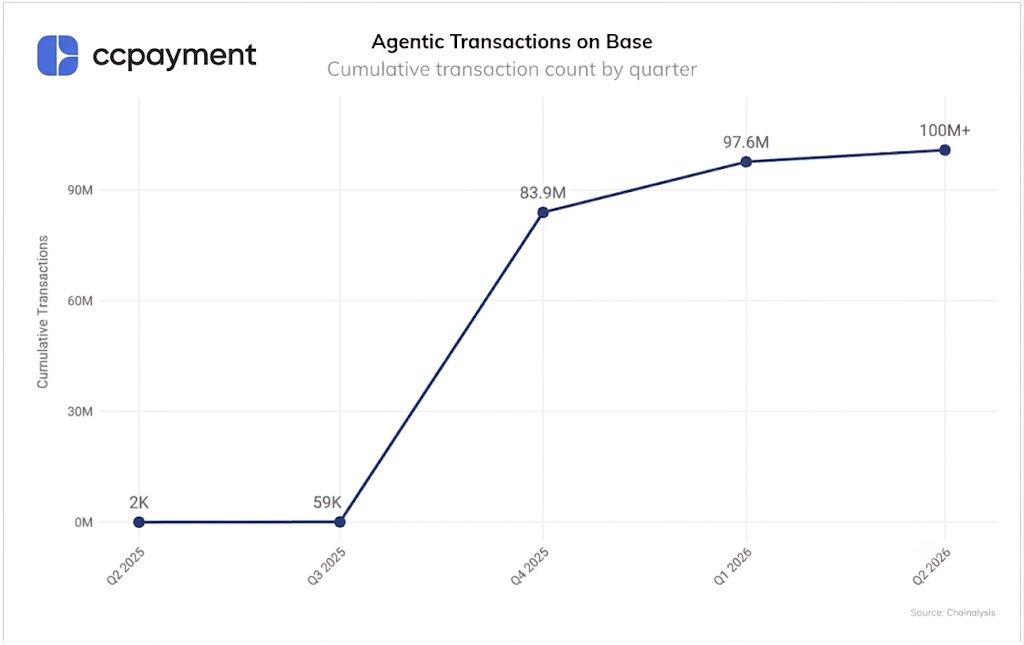
According to Chainalysis, x402-powered agent transactions on Base went from near zero in mid-2025 to over 100 million cumulative transactions by Q1 2026 — almost all settled in stablecoins.
The fee problem most teams discover too late
Most AI agent payments are micropayments. Keyrock’s analysis of real agent transaction data shows:
- Average transaction value: $0.31
- 76% of transactions fall below Visa’s $0.30 fixed fee floor (Keyrock data)
On a $0.31 payment, a traditional card processor would charge roughly the entire amount in fees. Stablecoin rails on-chain cost a fraction of a cent.This is why stablecoins have become the default payment layer for AI agent monetization, not an alternative.
Common AI Agent Payment Scenarios
AI Scenario | Payment Model |
|---|---|
AI Chatbot / API | Pay-per-use micropayments |
AI SaaS Product | Subscription + per-seat billing |
Agent-to-Agent (A2A) | Machine-to-machine settlement |
Your AI bot can already do the work. The question is whether it can get paid for it.
Self-Hosted Wallet vs. Crypto Payment Gateway
The instinct to build payment infrastructure in-house is understandable. The reality is a 3–6 month commitment before you have anything production-stable.
What Self-Hosting Actually Requires
- Running and maintaining full nodes per chain—and keeping them synced after every fork
- Building multi-chain transaction monitoring from scratch
- Managing private key infrastructure: if your bot can sign transactions, you now have a hot-key risk problem
- AML/KYT compliance logic, written by your team
- Manual settlement flows that break during network congestion
It's also worth noting the competitive context: Coinbase (x402 protocol), Stripe (MPP), Google (AP2), and Visa are all currently building competing AI payment infrastructure standards. The spec landscape is moving. Betting 6 months of engineering on a self-built stack before the dust settles is a real risk.
Why Most Developers Choose a Crypto Payment API
A crypto payment gateway abstracts all of that. You call endpoints, receive webhooks, handle credits. Node infrastructure, compliance screening, and settlement are the gateway's operational problem—not yours.
Feature | Self-Hosted | Payment Gateway(eg.CCPayment) |
|---|---|---|
Node Management | Manual, ongoing | Fully managed |
Webhooks | Build from scratch | Native, with retries |
KYT / AML | Build from scratch | Included |
Settlement | Manual | Flexible, zero rolling reserve |
Hot-Key Risk | Your architecture problem | Eliminated |
Launch Timeline | 3–6 months | Days– Integrate in just 3 Steps |
For any AI product where payments aren't the core IP, this trade-off isn't close.
How to Accept Payments with Permanent Deposit Addresses (5 Steps)
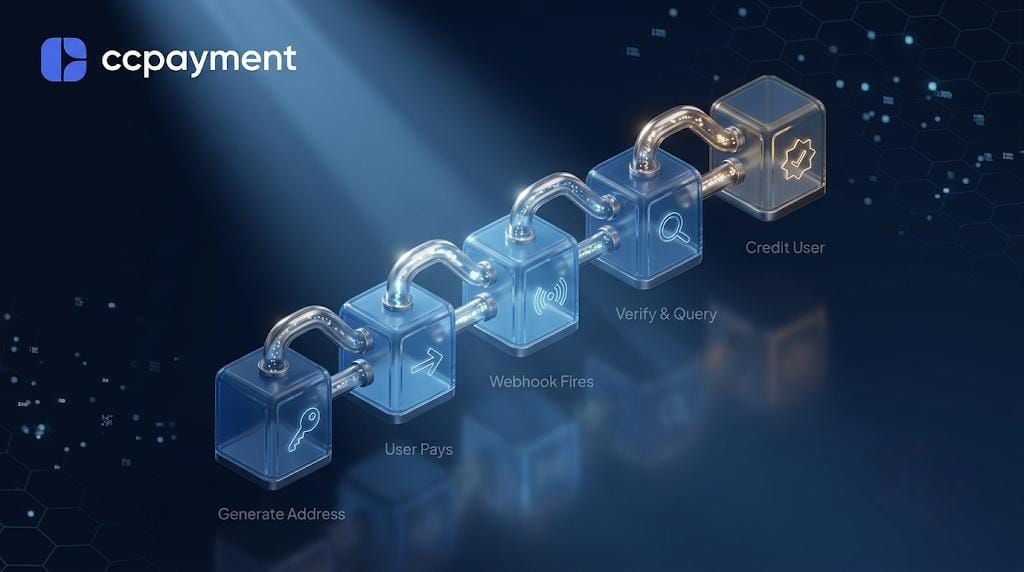
Step 1 — Generate a Permanent Crypto Deposit Address for AI Agents
Call getOrCreateAppDepositAddress once per user. Returns a permanent deposit address and a memo or tag where the chain requires one. This address never changes to that user—right for SaaS subscriptions, returning users, and high-frequency agent-to-agent payments where you want clean, persistent wallet identity.
app_id = "*** your app_id ***"
app_secret = "*** your app_secret ***"
url = "https://ccpayment.com/ccpayment/v2/getOrCreateAppDepositAddress"
content = {
"referenceId": str(int(time.time())),
"chain": "POLYGON"
}
Step 2 — Monitor Blockchain Confirmations
The gateway monitors on-chain state across all supported networks. Status transitions: Pending → Processing → Success. You don't run monitoring logic. You don't handle reorgs. You wait for the webhook.
Step 3 — Receive Webhook Notifications (with Silent Compliance)
A payment confirmation triggers a webhook to your endpoint. Here's a live example of the payload your server receives:
{
"type": "DirectDeposit",
"msg": {
"recordId": "2024031311310811...",
"referenceId": "63224704901...",
"coinId": 1329,
"coinSymbol": "MATIC",
"status": "Success",
"isFlaggedAsRisky":false
}
}
Step 4 — Query Deposit Records and Credit Users
This is the step most tutorials skip, and it's where the most production bugs live.Common assumption: payment confirmed → balance auto-updates
Correct flow:
Webhook received
↓
Call getDepositRecord API
↓
Retrieve: amount,asset,timestamp,tx hash etc.
↓
Your server applies credits to user balance
CCPayment monitors payments and delivers the deposit data. Your accounting logic stays entirely under your control. Funds land in your merchant wallet. Your business layer decides what that means for user balances—this matters for compliance, audit trails, and edge cases specific to your product.
Step 5 — Stablecoin Settlement & Treasury Strategy
Once a deposit is confirmed, funds are credited directly to your merchant balance. From here, you have full control:
- Hold the original asset — Keep ETH as ETH, USDT as USDT, or any other supported cryptocurrency.
- Auto-convert to stablecoins — Enable Auto-Swapfor Deposits in the dashboard. Incoming deposits are automatically swapped to your chosen stablecoin (e.g. USDT) the moment they are confirmed.
- Advanced treasury management — Use manual Swap, on-chain withdrawals, or custody tools to move funds as needed.
- Fiat off-ramp to bank — Convert USDT to USD and settle directly to your bank account via the “Sell USDT” feature (typically completed in 3–7 business days).
All options are configurable — not default behavior. You decide the strategy based on your business needs while maintaining clean compliance records and audit trails.
API & Webhook Best Practices You Must Follow
Verify the HMAC signature
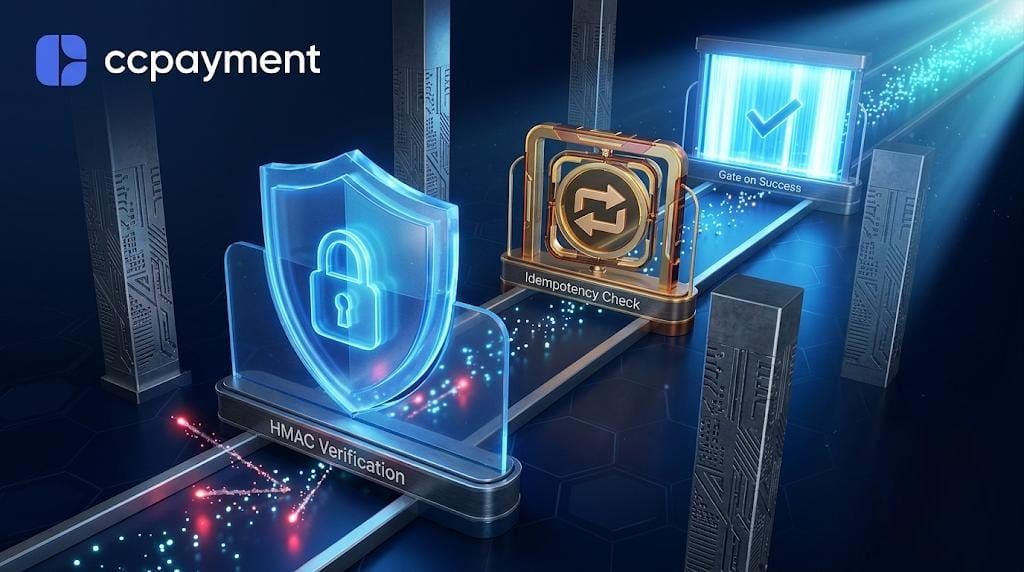
Every webhook request from CCPayment includes an HMAC signature in the header. Always validate it on your server. Skipping this step leaves you open to fake or tampered requests.
Handle duplicate deliveries (idempotency)
CCPayment will retry webhook delivery if your server doesn’t respond successfully. The same payment can be sent multiple times.
Simple fix: After processing a webhook for the first time, save the txid. On any later request with the same txid, just return HTTP 200 and skip processing.
Only trigger logic on "Success" status
Processing means the transaction was broadcast but not yet confirmed on-chain — it can still fail or be replaced. Only credit users or run important business logic when status is "Success".
4 Common Mistakes When AI Bot Accepts Crypto Payments
Many teams only notice these problems after going live. Here’s what usually goes wrong:
1. Chain confirmation times are very different
TRON settles in seconds. Ethereum and other chains can take minutes — sometimes much longer during busy periods. If you treat every chain the same, users will keep messaging support asking where their payment is.
2. Small payments need stablecoins from day one
When your bot charges $0.10–$2 per use, accepting volatile coins means you lose money on price changes between the time you receive it and when you settle. The easiest fix is to accept USDT or USDC directly, or turn on Auto-Swap so every payment is automatically converted to your preferred stablecoin the moment it arrives.
3. Crypto has no built-in refund button
On-chain payments are final. There’s no easy “refund to original card” like traditional payments. You need to design your own refund flow from the beginning — usually by giving users credit inside your app and handling the return through your own system.
4. Compliance is required, but you don’t have to build it yourself
CCPayment runs risk checks on every deposit. Suspicious transactions get flagged in your dashboard for review instead of being automatically blocked. This gives you visibility without stopping normal business.
If your AI product is already getting real usage but your payment setup still feels messy, these are the gaps worth fixing early.
Build Reliable AI Payment Infrastructure with CCPayment
CCPayment is built for this transition. It handles the blockchain nodes, the compliance screening, and the webhook retry logic, so your team doesn't have to. You get permanent deposit addresses, multi-chain support, and a clean API that takes about an afternoon to integrate.
For teams using AI coding tools, CCPayment also provides a SKILL.md file that gives your assistant full awareness of the API's endpoints, webhook patterns, and error handling. Drop it in and move faster. (See the full guide here: The 10-Minute Crypto Payment Gateway: A Developer's Guide to AI-Driven Integration)
For solo developers and small teams building AI products with AI tools, this is the fastest path from architecture understanding to working payment code. It's also a useful pattern to note: the same AI agent infrastructure you're building for your users is now available to help you build it.
Your AI bot is already doing the work. Give it a way to get paid.
👉 [Create Your CCPayment Account and Start with a 0.2% Rate Today]
About CCPayment
The enterprise-grade crypto payment rail. Scale global commerce with an industry-low 0.2% fee, 900+ assets, and zero-code AI integrations.
🌐 Website: ccpayment.com → 📢 Official Channel: @CCPayment_Channel Join for weekly SaaS insights, Web3 trends, and API guides. 🤖 24/7 Support: @CCPaymentSupportBot
Crypto Adoption for Business 2026
Deep dives into Web3 payments, industry trends, and how to scale your global commerce with zero-code integrations.
FAQ
Can an AI bot generate deposit addresses and handle payments autonomously—no human required?
Yes. getOrCreateAppDepositAddress is a programmatic API call. Your bot provisions addresses per user, receives status updates via webhook, and processes credits without human intervention at any step.
How do I prevent a user from being credited twice for one payment?
Use TxID (transaction hash) as a unique key. Store it on first processing. Check before every credit operation—if the ID exists, return 200 and skip. This single check handles all duplicate-crediting scenarios regardless of how many retries fire.
Does this architecture support agent-to-agent (A2A) payments?
The API is fully programmatic with no UI dependency. Permanent deposit addresses map cleanly to agent identity, making it well-suited for autonomous machine-to-machine settlement. No human-facing checkout flow required.
What's the actual difference between Processing and Success, and why does it matter in practice?
Processing = the transaction was broadcast but hasn't finalized on-chain. It can still fail. Success = confirmed and irreversible. Unlocking access on Processing is how double-spend exploits happen. Always gate on Success.
What's the SKILL.md integration option and how does it work?
CCPayment provides a SKILL.md file you can import directly into an AI coding assistant—Claude, Cursor, GitHub Copilot, or any tool that supports file-based context. Once imported, the assistant understands CCPayment's full API surface: endpoints, response structures, webhook behavior, error handling, and the idempotency patterns covered in this guide. It can then generate integration code, review your implementation, and answer API-specific questions without you having to copy-paste documentation manually. It's the fastest path to a working integration if you're already using AI tools to build.
If CCPayment's KYT flags a transaction, what happens to my funds?
The transaction goes to compliance review. CCPayment does not arbitrarily freeze merchant funds. The screening layer is designed to protect merchants from high-risk counterparties—not to hold your capital. Merchants retain control throughout the review process.
Featured on Medium