Crypto Point of Sale (POS): How to Accept Crypto Payments In --Store [2026]

![Crypto Point of Sale (POS): How to Accept Crypto Payments In --Store [2026]](/blog/content/images/size/w2000/2026/09/------pos.PNG)
⏱️ TL;DR: A crypto point of sale lets merchants accept in-store crypto payments using devices they already have. CCPayment offers QR codes for simple open-amount payments, invoices for bookings or balances paid later, and APIs for connecting an existing POS or order system. Merchants can accept 900+ cryptocurrencies across 100+ blockchain networks, track transactions, and use Auto-Swap for supported assets.
Introduction
A crypto point of sale helps shops, restaurants, hotels, and service providers accept cryptocurrency in person, including stablecoins such as USDT and USDC.
Stablecoins are also playing a growing role behind traditional payment products. Visa has reported continued growth in stablecoin settlement, while Mastercard announced plans in June 2026 to expand its stablecoin settlement options.
At the store level, accepting crypto starts with a straightforward checkout experience. Customers need clear payment instructions, and staff need to know when a sale is paid. This guide explains how crypto POS works, what to look for in a provider, and how to get started with CCPayment using the equipment you already have.
What Is a Crypto Point-of-Sale (POS) System?
A crypto POS system is the infrastructure used to accept cryptocurrency during an in-person sale. It connects the merchant's checkout, the customer's wallet, and the relevant blockchain.
The system displays details such as the amount, token, network, address, and QR code. The customer scans the QR code or opens an order-linked payment page and approves the transfer.A cryptocurrency point of sale can work alongside the merchant's existing retail software, which can continue to manage inventory, taxes, receipts, and staff permissions.
Crypto POS ≠ Crypto POS Machine
Here, POS describes the checkout process itself. It covers presenting the payment request, confirming the transaction, and recording the sale.This process can run on a phone, tablet, computer, or existing checkout screen through a QR code or hosted payment page. A dedicated crypto terminal is optional.
How Does a Crypto POS Payment Work?
Consider a café using CCPayment where a customer's bill is $25 and the customer wants to pay in USDT.
Merchant Creates the Payment
The cashier creates a $25 payment order through the store's connected POS or checkout. The customer selects USDT and a supported network, and the payment page displays the exact crypto amount, address, and QR code.
For a simple, open-amount payment, the merchant can display a deposit QR code for a selected token and network, and the customer enters the amount. When the sale requires a fixed amount and order details, an invoice provides a more structured option.
Customer Pays With Crypto
The customer scans the code with a compatible wallet, checks the token, network, address, and amount, then confirms the transfer.
Merchant Confirms the Payment
CCPayment detects the transaction and updates its status as it receives the required blockchain confirmations. The cashier can review the payment status in the connected POS system or CCPayment transaction records, depending on the setup.
Once the payment is confirmed, the merchant can complete the sale. The funds are credited in the asset paid by the customer or automatically converted into the merchant’s preferred token when Auto-Swap is enabled.
Crypto POS vs.Traditional POS: What's the Difference?
| Area | Traditional POS | Crypto POS |
| Payment method | Card, cash, or mobile wallet | Cryptocurrency or stablecoin wallet |
| Payment rail | Bank and card networks; issuer approval required | Blockchain network; no issuer approval |
| Interface | Card terminal or retail POS | QR code, invoice, hosted checkout, or API |
| Settlement | Usually local fiat | Original asset or preferred token through Auto-Swap |
| Timing | Fast authorization; settlement may take business days | Can be credited within minutes, depending on the network |
| Disputes | Card disputes and chargebacks may apply | Confirmed on-chain transfers generally cannot be reversed by the payer |
| Records | POS and acquirer reports | Payment status, order records, and transaction hashes |
Merchants can add crypto payments alongside cards and cash within their existing checkout process.
What Should Businesses Look for in a Crypto POS System?
- How will it work at the counter? A small shop may only need a QR code or invoice. A busy retailer may want payments linked to its existing order system. In either case, staff should be able to check whether an order has been paid.
- Can customers pay with what they already hold? Check the supported tokens and networks together. Clear payment instructions help customers choose the correct network and complete their transfer.
- What happens after the payment arrives? Think about which assets you want to keep. A 2025 Coinbase survey found that 81% of crypto-aware U.S. SMBs were interested in using stablecoins in their business. If you prefer to hold revenue in USDT or USDC, look for automatic conversion so you can accept other supported assets with fewer manual swaps.
Before choosing a provider, check its confirmation workflow, transactions and fees, including processing, conversion, and network costs.
How Businesses Can Accept In-Store Crypto Payments With CCPayment
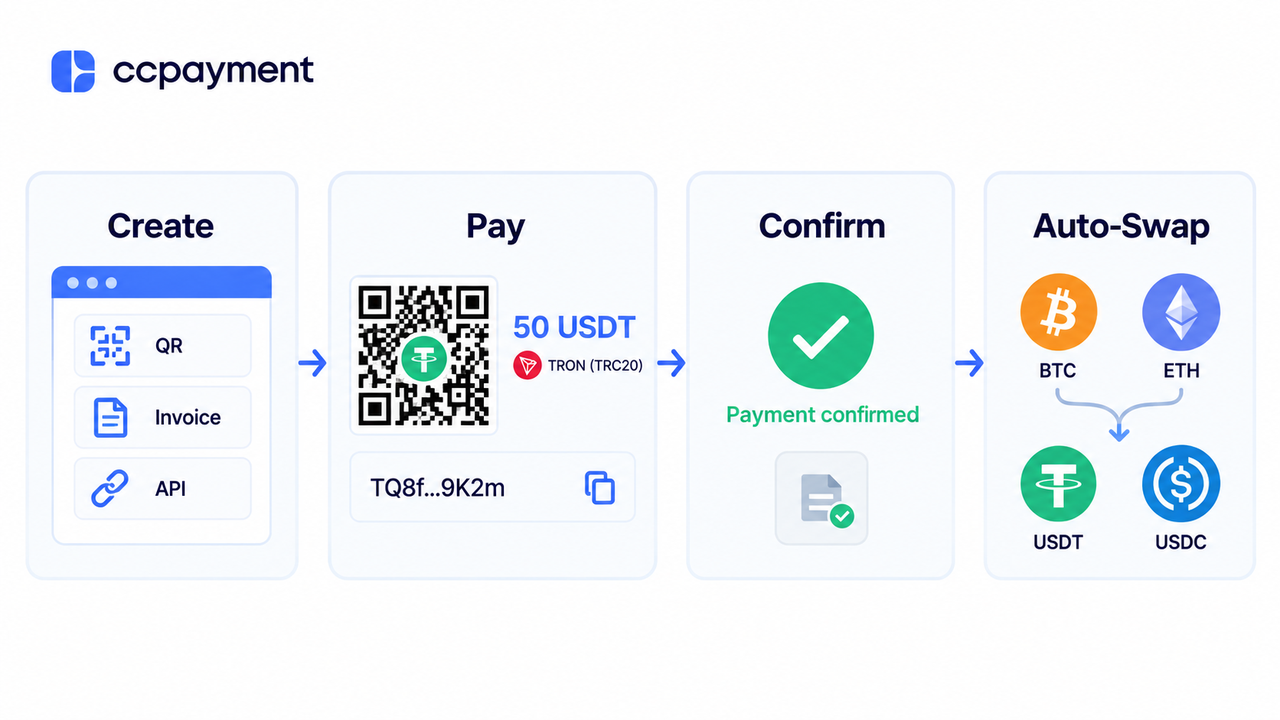
CCPayment supports in-store crypto collection and asset management through one merchant account, with access to more than 900 cryptocurrencies across 100+ blockchain networks. Here’s how merchants can use it at the counter and manage the funds they receive.
1.Show a QR Code at the Counter
For a simple counter payment, the merchant selects a token and network in the CCPayment Dashboard and shows the generated address and QR code. The customer scans the code and enters the amount in their wallet. It suits open-amount payments, tips, and occasional transactions.Learn how to generate a deposit address and QR code.
2.Create and Send an Invoice
When a sale has a fixed value, the merchant can create an invoice with the amount, order details, and payer information. The customer receives the invoice by email, chooses from the payment options enabled by the merchant, and completes the transfer using the payment details or QR code provided.
Hotels, travel providers, and professional services can use invoices for bookings, deposits, and balances paid later.
3.Connect CCPayment to an Existing POS or Order System
Businesses that need more automation can use the CCPayment Deposit APIs to add crypto payments to a POS, kiosk, tablet app, or internal order system.
The createInvoiceUrl API generates a hosted checkout where customers select their token and network. The merchant can link each payment to its own order and receive payment status updates notifications through webhooks, and verify the payment record before marking the sale as paid.
4.Manage Revenue With Auto-Swap
Payments are normally credited in the asset used by the customer. With Auto-Swap, merchants can automatically convert supported incoming assets into USDT, USDC, or another supported token. Converting eligible payments into stablecoins reduces manual swaps and exposure to price swings.
Who Can Benefit From Crypto POS Payments?

Crypto POS payments are especially useful for businesses whose customers already hold crypto or who serve customers across different markets. Common use cases include:
- Shops, cafés, restaurants, and entertainment venues that want to offer QR-based payments at the counter.
- Hotels, travel providers, and professional services that collect booking deposits, service fees, or invoice balances.
- High-value retailers looking for another way to accept payments from international customers.
- Omnichannel businesses that want the same crypto payment flow across their physical locations and online channels.
Start Accepting Crypto Payments In Store
Give customers the option to pay with the crypto they already hold. With CCPayment, you can bring crypto payments to your counter using the equipment you already have.
Ready to accept your first in-store crypto payment? 👉 Create a CCPayment merchant account and get started with deposit fees as low as 0.2%.
Building an integrated checkout? Explore the CCPayment Deposit APIs to connect payments to your POS or order system.
FAQ
Q1: What are the business benefits of a crypto POS system?
A: A crypto POS system gives customers an additional way to pay in-store and can support merchants serving international or crypto-native customers. Confirmed on-chain payments are generally not subject to payer-initiated card chargebacks, although merchants should maintain clear payment and refund policies.
Q2: Do businesses need a dedicated crypto POS machine?
A: No. Merchants can display a QR code or checkout on an existing phone, tablet, computer, or checkout screen. An API can connect the payment flow to an existing POS or order system when more automation is needed.
Q3: Can businesses accept USDT payments in a physical store?
A: Yes. A USDT POS payment can be collected through a QR code or an API-connected checkout. Invoices can also support bookings, deposits, or balances paid separately from the immediate counter transaction.
Q4: Can merchants avoid holding volatile cryptocurrencies?
A: Yes. Where supported, Auto-Swap can automatically convert incoming assets such as BTC or ETH into a preferred token such as USDT or USDC. This reduces the need for manual conversion and makes revenue easier to manage.
Q5: Can the same crypto POS support online and in-store payments?
A: Yes. CCPayment’s payment APIs can support both in-store and online payment flows, allowing merchants to link payments to orders and manage transaction records through one merchant account. The available integration method depends on the merchant’s checkout setup.
Crypto Adoption for Business 2026
Deep dives into Web3 payments, industry trends, and how to scale your global commerce with zero-code integrations.