

How to Add Bitcoin Payments to Your Website
Share
⏱️ TL;DR: Connect your website to CCPayment through hosted checkout, a custom API checkout integration, or an e-commerce plugin. Create an order, show the BTC payment details, and use verified payment updates to trigger delivery. CCPayment handles blockchain monitoring and supports optional Auto-Swap into USDT or USDC, reducing work across development and payment operations.
To add Bitcoin payments to your website, connect your checkout to a bitcoin payment gateway and link each payment to an order. CCPayment provides payment interfaces, monitors BTC transfers, and notifies your website when it can complete the purchase.
What Do You Need to Accept Bitcoin Payments Online?
Website or checkout. Your website creates the purchase and records its price, customer details, and order reference.
Payment gateway. CCPayment generates payment details and monitors transfers, saving your developers from maintaining their own Bitcoin monitoring infrastructure.
Blockchain transaction. The customer sends BTC from a wallet or exchange to the payment address on the Bitcoin network.
Payment verification. The gateway notifies your backend of payment-status changes. Your system verifies the corresponding order before triggering fulfillment.
Three Ways to Add Bitcoin Payments to a Website
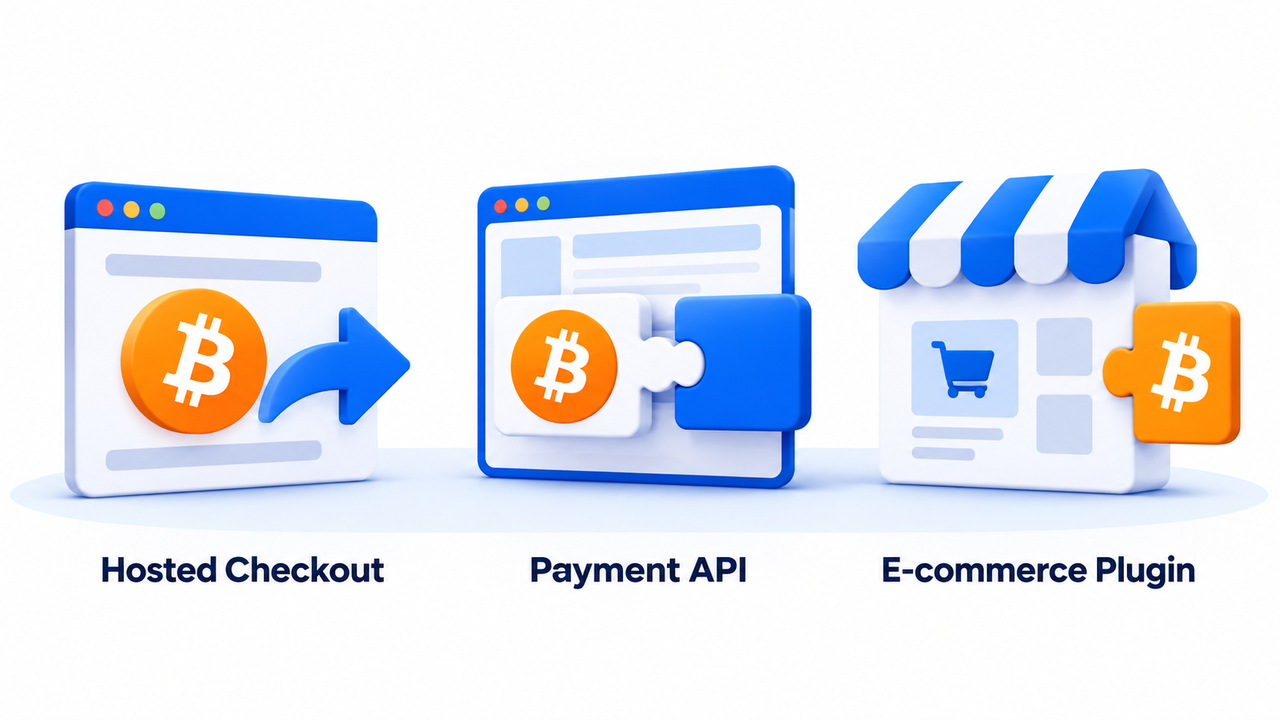
Hosted Crypto Checkout
Choose hosted checkout to use CCPayment's prepared payment page and reduce payment-interface development. Your backend creates a payment request through the API, receives a checkout link, and redirects the buyer there to pay.
Your website creates the purchase and handles payment updates; CCPayment provides the page where the customer completes payment.
Custom Checkout with the Payment API
Choose a custom Payment API checkout when you want to display the payment details within your own website or application. Your developers control the interface while CCPayment supplies the payment infrastructure behind it.
This works well for custom storefronts, SaaS purchases, and account upgrades where payment needs to fit an existing product experience. Keep API credentials on your server and connect incoming payment results to your order system.
E-commerce Plugin
For an existing store, CCPayment offers ready-to-use plugins for Shopify, WooCommerce, Magento, OpenCart, WHMCS, and PrestaShop.
Install the appropriate plugin, enter your API credentials, and enable crypto payments. You can add Bitcoin as a checkout option through your existing platform, reducing the custom development needed to start accepting BTC.
How Bitcoin Payment Integration Works Step by Step
Before creating your first payment, activate your merchant account, review Supported Cryptocurrencies, and enable BTC on Bitcoin mainnet. Obtain the credentials needed for your integration. Configure a Webhook URL so CCPayment can notify your backend of payment updates.
Consider a customer buying a $20 SaaS plan. Here is how that purchase moves from checkout to account access.
Step 1: Create the Payment Order
Your website creates the purchase and sends a payment request to CCPayment with a unique merchant order ID. Store that order ID together with the checkout or payment details returned by CCPayment.
For the $20 plan, this establishes which customer and subscription the incoming payment belongs to. Your support team also has a reference for tracing the purchase later.
Step 2: Present the Bitcoin Payment Details
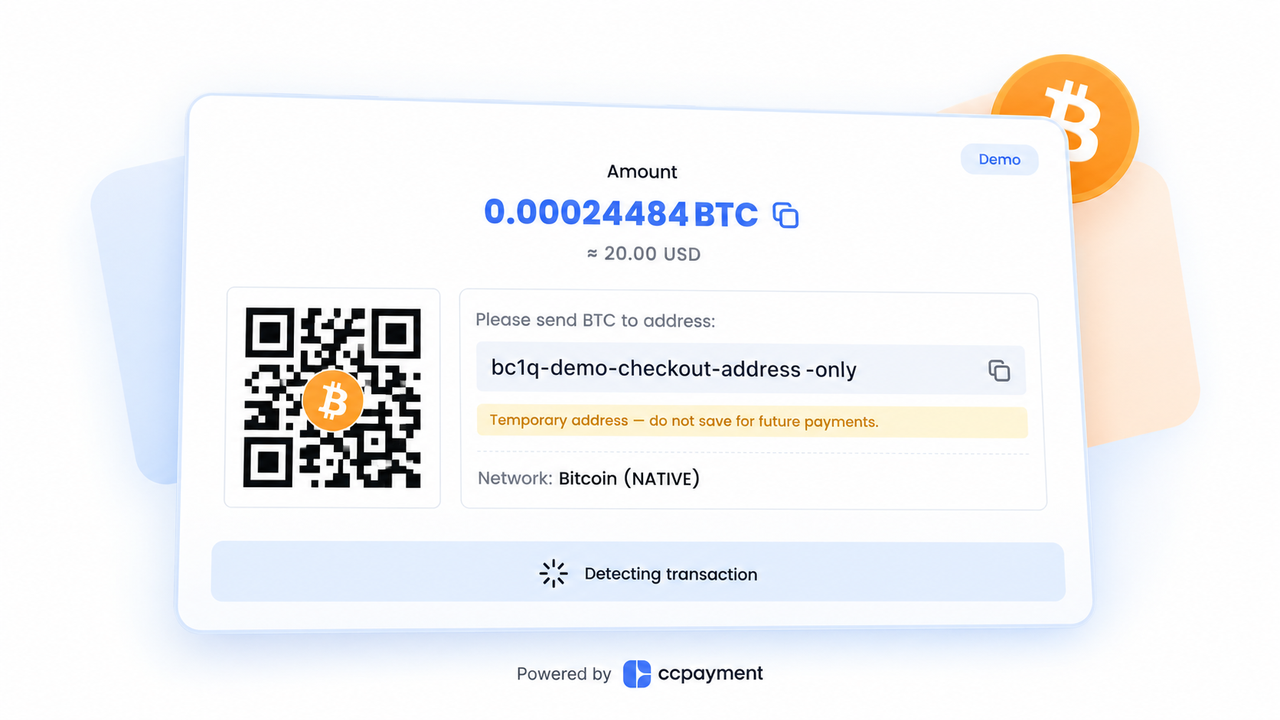
Display the BTC amount, receiving address, Bitcoin network, and any applicable payment expiry. Hosted checkout provides the payment page; a custom integration displays the returned details in your own interface.
Clear payment instructions and a QR code where available reduce copying errors. The Bitcoin Developer Guide explains the relationship between payment requests, amounts, and receiving addresses.
Step 3: Detect the Blockchain Transaction
The customer sends BTC to the payment address, and CCPayment automatically monitors the incoming transfer, reducing manual transaction checks for your team.
Your website can display a processing status while awaiting the payment result, keeping the customer informed as the purchase moves toward completion.
Step 4: Confirm the Payment
Bitcoin payments remain in Processing until CCPayment applies the required confirmation policy and reports the transaction as Success. Once your backend verifies Success for the matching order and amount, your website can trigger fulfillment.
Bitcoin's FAQ explains how blockchain confirmations work. With CCPayment, your integration uses the verified Success status to determine when to complete the order.
Step 5: Update the Order Through Webhook
CCPayment sends a webhook to your backend. Verify the Webhook signature and query the corresponding order information. If the verified payment meets your fulfillment conditions, mark the purchase as paid and activate the customer’s plan.
This connects payment to delivery without routine manual checks. Handle repeated notifications so one payment triggers one activation, and use scheduled queries to reconcile missed updates. The API Documentation covers implementation details.
What Happens After the Customer Pays?
Once the BTC is credited to your CCPayment merchant balance, you can retain it, swap it for another supported asset, or withdraw it to an external wallet.
You can convert BTC directly in the merchant dashboard without a swap service fee, making it easy to manage your balance before paying suppliers or moving funds.
Prefer to receive revenue in stablecoins? Enable Auto-Swap in your merchant dashboard to automatically convert incoming BTC payments into USDT or USDC. This reduces manual conversions and helps you manage revenue in the currency you use for day-to-day operations.
Common Bitcoin Payment Integration Issues
Incorrect Order-to-Transaction Mapping
Two customers may purchase the same plan for the same amount. Matching by amount alone can credit the wrong account; keep the website order ID linked to CCPayment’s payment record throughout the purchase.
Treating an Unconfirmed Transaction as Final
A customer may share a transaction hash before the gateway has accepted the payment. Keep the order pending until CCPayment reports Success, rather than granting access based on a wallet screenshot or an unverified transaction hash.
Failing to Handle Payment-Status Webhooks Correctly
A repeated notification can accidentally trigger a second delivery; a missed notification can leave a paying customer waiting. Verify messages, prevent duplicate fulfillment, and reconcile order records regularly. Before launch, test both successful purchases and recovery from interrupted notifications.
Start Accepting Bitcoin Payments With CCPayment
Add Bitcoin to your checkout with CCPayment handling transaction monitoring and payment notifications. Connect successful payments to delivery, then manage the revenue from your merchant balance.Create your CCPayment merchant account and start accepting Bitcoin payments on your website!
Crypto Adoption for Business 2026
Deep dives into Web3 payments, industry trends, and how to scale your global commerce with zero-code integrations.
FAQ
Q1: Can I accept Bitcoin payments on my website alongside credit cards?
A: Yes. Offer Bitcoin as an additional checkout option while retaining your existing payment methods, giving customers another way to complete a purchase without requiring a full payment-system migration.
Q2: Do I need to price products in BTC to accept Bitcoin payments online?
A: No. Your products can remain priced in a fiat currency while customers pay the corresponding BTC amount. CCPayment supports fiat-priced payment orders, helping you add crypto payments without rebuilding your product pricing.
Q3: Can I accept Bitcoin payments for SaaS subscriptions?
A: Yes. Connect successful BTC payments to monthly or annual access, so your website can activate or renew the customer’s plan. For subsequent billing cycles, send a new payment request for the customer to complete.
Q4: How do refunds work for Bitcoin payments on a website?
A: Bitcoin refunds are sent as separate transactions to a verified customer-provided BTC address. Confirm the refund amount and receiving address with the customer, then process the transfer according to your store's refund policy.